
Event Scheduler
In real-world applications, there's often a need to automatically execute certain actions on a schedule: cleaning up old records, updating statistics, generating reports.
For these tasks, MySQL provides a mechanism called scheduled events.
Events in MySQL are similar to a task scheduler in an operating system: you create a task once, and the database executes it automatically on schedule.
For these tasks, PostgreSQL uses the pg_cron extension. It lets you create scheduled tasks using cron syntax (as in Unix systems).
When it is useful
Scheduled events help automate the following tasks:
With pg_cron, you can automate:
- Data cleanup: removing outdated log records or temporary data
- Statistics updates: recalculating aggregated data for analytics
- Report generation: automatically creating periodic reports
- Data maintenance: moving records to archive tables and performing other routine operations
Enabling the scheduler
Before creating events, make sure the event scheduler is enabled:
MySQL 8.4SHOW VARIABLES LIKE 'event_scheduler';
If the scheduler is disabled, enable it:
MySQL 8.4SET GLOBAL event_scheduler = ON;
This command changes the setting until the next server restart and requires permission to modify global system variables. To enable the scheduler permanently, use the server configuration or SET PERSIST if it is available in your MySQL version.
First, install pg_cron on the server, add it to shared_preload_libraries, and restart PostgreSQL. You can then create the extension in the database:
MySQL 8.4CREATE EXTENSION IF NOT EXISTS pg_cron;
One-Time Execution
Let's start with the simplest case — an event that executes once at a specific time:
Let's start with the simplest case — a task that executes once at a specific time:
MySQL 8.4CREATE EVENT cleanup_old_logs
ON SCHEDULE AT CURRENT_TIMESTAMP + INTERVAL 1 DAY
DO
    DELETE FROM logs WHERE created_at < NOW() - INTERVAL 30 DAY;
This event will delete log records older than 30 days, 24 hours after the event is created.
Breaking down the syntax:
- CREATE EVENT cleanup_old_logs — create an event named cleanup_old_logs
- ON SCHEDULE AT — specify when the event should execute
- CURRENT_TIMESTAMP + INTERVAL 1 DAY — execution time (in 1 day)
- DO — the event body: one simple SQL statement or a BEGIN ... END compound statement
pg_cron does not have a separate schedule type for a one-time run. Use an external application scheduler for this case, or create a temporary task and remove it after it runs.
For example, this task deletes old log records the next time 3:00 AM occurs and then removes itself:
MySQL 8.4SELECT cron.schedule(
    'cleanup_old_logs_once',
    '0 3 * * *',
    $command$
    DO $$
    BEGIN
        DELETE FROM logs WHERE created_at < NOW() - INTERVAL '30 days';
        PERFORM cron.unschedule('cleanup_old_logs_once');
    END;
    $$;
    $command$
);
Normally, the '0 3 * * *' schedule runs a task every day at 3:00 AM. After its first run, however, this task calls cron.unschedule() with its own name, so it does not run again.
Recurring Execution
More often, events need to run periodically — every day, hour, or minute:
More often, tasks need to run periodically — every day, hour, or minute:
MySQL 8.4CREATE EVENT update_statistics
ON SCHEDULE EVERY 1 HOUR
DO
BEGIN
    UPDATE product_stats SET
        total_sales = (SELECT SUM(amount) FROM orders WHERE product_id = product_stats.product_id),
        last_updated = NOW();
END;
This event will update sales statistics every hour.
Breaking down the syntax:
- ON SCHEDULE EVERY 1 HOUR — execute every hour
- BEGIN ... END — a compound statement to which you can add multiple SQL statements when needed
Interval options:
- EVERY 1 MINUTE — every minute
- EVERY 1 HOUR — every hour
- EVERY 1 DAY — every day
- EVERY 1 WEEK — every week
- EVERY 1 MONTH — every month
- EVERY 30 SECOND — every 30 seconds
MySQL 8.4SELECT cron.schedule(
    'cleanup_old_logs',
    '0 3 * * *',
    'DELETE FROM logs WHERE created_at < NOW() - INTERVAL ''30 days'''
);
This task will run every day at 3:00 AM and delete log records older than 30 days.
Breaking down the syntax:
- cron.schedule() — function to create a scheduled task
- 'cleanup_old_logs' — task name
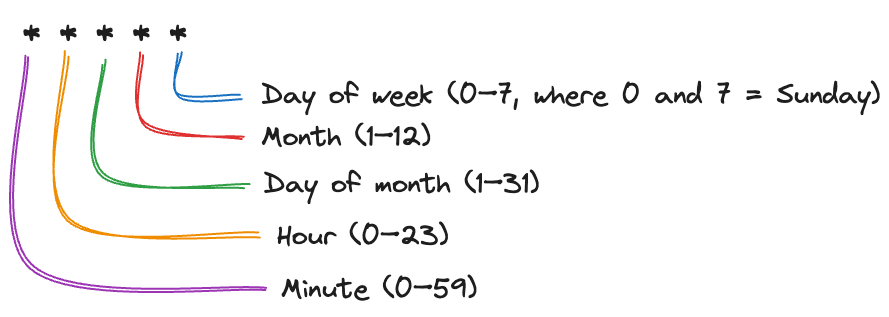
- '0 3 * * *' — schedule in cron format (minute, hour, day of month, month, day of week)
- last parameter — SQL command to execute
Cron schedule format:
MySQL 8.4SELECT cron.schedule(
    'update_statistics_hourly',
    '0 * * * *',
    $$
    UPDATE product_stats SET
        total_sales = (SELECT SUM(amount) FROM orders WHERE product_id = product_stats.product_id),
        last_updated = NOW()
    $$
);
This task will update sales statistics every hour (at the start of each hour).
Schedule examples:
- '*/5 * * * *' — every 5 minutes
- '0 * * * *' — every hour (at the start of the hour)
- '0 0 * * *' — every day at midnight
- '0 0 * * 0' — every Sunday at midnight
- '0 9 1 * *' — first day of each month at 9:00 AM
- '30 seconds' — every 30 seconds in pg_cron 1.5 and later
Second-based intervals use a separate string rather than a sixth cron field. pg_cron supports values from 1 to 59 seconds.
Limiting the Execution Period
Sometimes you need an event to run only during a specific period.
Sometimes you need a task to run only during a specific period.
MySQL 8.4CREATE EVENT temporary_log_cleanup
ON SCHEDULE EVERY 1 DAY
STARTS CURRENT_TIMESTAMP
ENDS CURRENT_TIMESTAMP + INTERVAL 30 DAY
DO
    DELETE FROM logs WHERE created_at < NOW() - INTERVAL 30 DAY;
This event will delete outdated logs once a day for 30 days.
New elements:
- STARTS — start of the event's active period
- ENDS — end of the event's active period
After ENDS, the event stops running and is dropped by default. Add ON COMPLETION PRESERVE when creating it if you want to retain its definition.
A pg_cron schedule cannot specify a date when a task should stop automatically. For example, create a task that cleans up logs daily for the next 30 days with a regular schedule:
MySQL 8.4SELECT cron.schedule(
    'temporary_log_cleanup',
    '0 0 * * *',
    $$DELETE FROM logs WHERE created_at < NOW() - INTERVAL '30 days'$$
);
To stop the task automatically, use the same approach as in the one-time execution example above: create a stop_temporary_log_cleanup task for a date 30 days from now. Its command body looks like this:
MySQL 8.4DO $$
BEGIN
    PERFORM cron.unschedule('temporary_log_cleanup');
    PERFORM cron.unschedule('stop_temporary_log_cleanup');
END;
$$;
The first call removes the cleanup task, and the second removes the helper task. In the helper task's schedule, specify the minute, hour, day, and month of the date 30 days from now.
Viewing the Schedule
To see all created events:
MySQL 8.4SHOW EVENTS;
To view events in a specific database:
MySQL 8.4SHOW EVENTS FROM your_database_name;
To see scheduled tasks available to the current user:
MySQL 8.4SELECT * FROM cron.job;
A regular user sees only their own tasks. A superuser or a role with the BYPASSRLS attribute can see tasks created by other users.
To view task execution history:
MySQL 8.4SELECT * FROM cron.job_run_details
ORDER BY start_time DESC
LIMIT 10;
Managing the Schedule
Temporarily disable an event:
MySQL 8.4ALTER EVENT cleanup_old_logs DISABLE;
Enable an event:
MySQL 8.4ALTER EVENT cleanup_old_logs ENABLE;
Change event schedule:
MySQL 8.4ALTER EVENT cleanup_old_logs
ON SCHEDULE EVERY 2 HOUR;
Delete an event:
MySQL 8.4DROP EVENT IF EXISTS cleanup_old_logs;
Remove a scheduled task:
MySQL 8.4SELECT cron.unschedule('cleanup_old_logs');
Or by task ID:
MySQL 8.4SELECT cron.unschedule(42); -- where 42 is the jobid from cron.job table
Modify a task:
You can change the schedule, command, and active state of an existing task with cron.alter_job():
MySQL 8.4SELECT cron.alter_job(
    42,
    schedule := '0 */2 * * *'
);
Here, 42 is the task's jobid from the cron.job table.
-
Access privileges: Creating events requires the EVENT privilege.
-
Time zone: MySQL interprets the schedule using the current session's time_zone when the event is created or altered and stores that time zone with the event.
-
Overlapping runs: If an event runs longer than its interval, MySQL may start multiple instances at the same time. Use a lock or another concurrency guard when overlapping runs are not acceptable.
-
Performance: A suitable frequency depends on the cost of the operation and the database load, not on a universal minimum interval.
-
Access privileges: A superuser usually installs the extension, after which regular users can be granted USAGE on the cron schema. A task runs with the privileges of the user who created it.
-
Time zone: Cron expressions use the cron.timezone setting, which defaults to GMT. Check the current value with SHOW cron.timezone;.
-
Intervals: pg_cron 1.5 and later supports intervals from 1 to 59 seconds. Choose the frequency based on the cost of the task and the expected load.
-
Overlapping runs: pg_cron does not run multiple instances of the same task concurrently. If the next run becomes due while the task is still running, it is queued.
-
Logging: When cron.log_run is enabled, execution details are saved in cron.job_run_details. Logging is enabled by default.
Self-Check
What is the minimum interval you can use for recurring events?
What is the minimum interval you can use for recurring tasks?
Scheduled events are a powerful tool for automating routine database tasks. They help maintain data cleanliness, update statistics, and perform maintenance operations without developer intervention! 🚀
Scheduled tasks are a powerful tool for automating routine database work. They help maintain data cleanliness, update statistics, and perform maintenance operations without developer intervention! 🚀